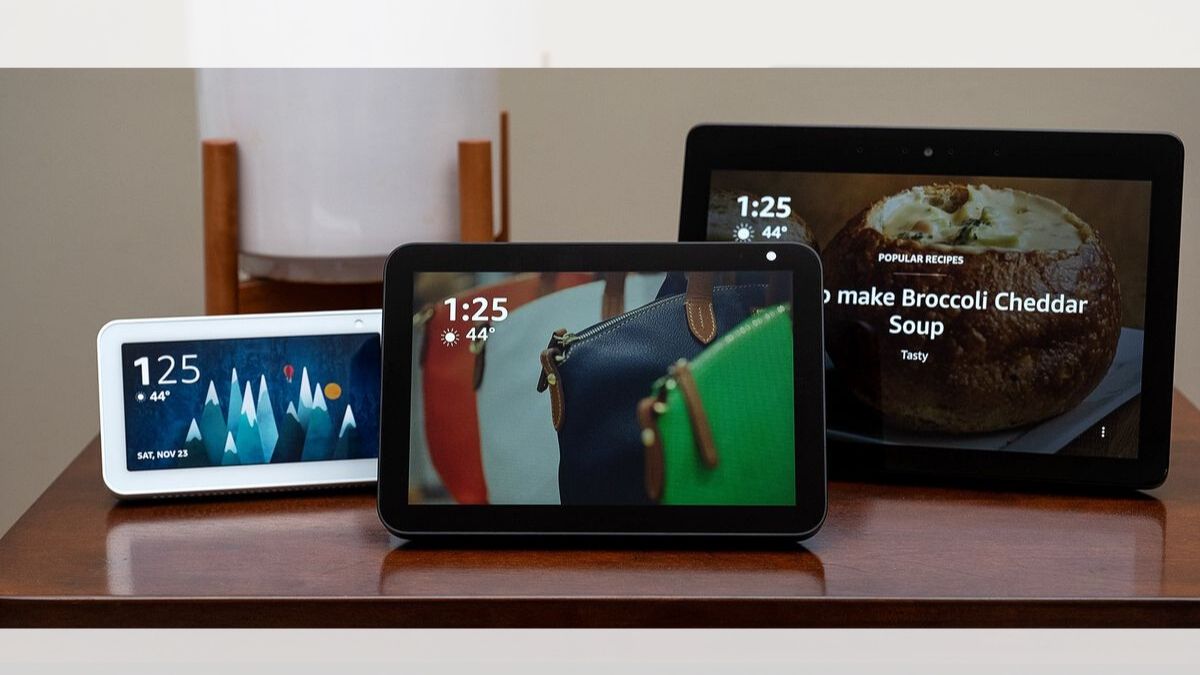
A smart display is a smart speaker with a touchscreen. It answers questions like a normal voice assistant, but it can also show your calendar, play videos, make video calls, show who is at the door and control your lights and other smart home gadgets. The right one depends on what you will use it for, so in this guide we group the best smart displays by need: everyday use, podcast listening, busy mornings and commutes, content creators, premium buyers and privacy.
Quick picks:
- Best overall: Amazon Echo Show 8
- Best for podcasts and audio: Amazon Echo Show 8 or Echo Show 11
- Best for commuters and bedside use: Amazon Echo Show 5 or Google Nest Hub
- Best for content creators: Amazon Echo Show 15
- Best premium (big screen) pick: Amazon Echo Show 21
- Best for privacy: Google Nest Hub (2nd gen), which has no camera
- Best for controlling a smart home: Amazon Echo Hub
What Is a Smart Display and Do You Need One?
If you already use a voice assistant on your phone or a smart speaker, a smart display adds a screen to that experience. You can see the weather instead of just hearing it, follow a recipe step by step, check a camera feed, scroll through song lyrics or glance at your day’s schedule. Most smart displays also work as a digital photo frame when you are not using them.
You probably do not need one if you only want music. In that case a good smart speaker will sound better for the money. A smart display makes sense when you want information at a glance, video calls or easy control of smart home devices.
Best Smart Display Overall: Amazon Echo Show 8
The Echo Show 8 hits the sweet spot between size, sound and price. Its 8-inch class screen is large enough for recipes, video calls and short videos, but small enough for a kitchen counter, desk or living room shelf. It has a built-in camera for video calls with a physical privacy shutter, and it can control compatible smart lights, plugs, cameras and doorbells through Alexa.
Good for: families, kitchens and anyone buying their first smart display.
Keep in mind: it works best if you already use Alexa or Amazon services.
Best Smart Display for Podcasters and Podcast Listeners
If you listen to a lot of podcasts, audiobooks or talk radio, sound quality and app support matter more than screen size. The Echo Show 8 and the larger Echo Show 11 have the strongest speakers in Amazon’s mid-size range, and they support popular audio services such as Spotify, Audible, Amazon Music and Apple Music, along with many podcast apps.
The screen helps too: you can see episode titles, skip chapters and control playback with a tap while you cook or work.
Tip for podcast creators: a smart display is not a recording device. Its microphones are designed for voice commands, not studio-quality audio. Use it to check your schedule, run timers during recording sessions or play back episodes, but record with a proper USB or XLR microphone.
Best Smart Display for Commuters and Busy Mornings
For commuters, the most useful feature is a quick morning briefing. With a routine you can say one phrase, such as “Good morning”, and hear the weather, your first meetings, news headlines and traffic to work while you get ready.
The compact Echo Show 5 is ideal for this. It sits neatly on a bedside table, works as an alarm clock with a sunrise-style screen, and shows the time, weather and reminders at a glance. The Google Nest Hub (2nd gen) is a strong alternative if you use Google Calendar and Google Maps, because it can show your commute and agenda from your Google account.
Good for: bedrooms, small desks and people who want a calm start to the day without picking up their phone.
Best Smart Display for Content Creators
Content creators juggle schedules, upload deadlines, collaborators and family life. A large wall-mountable display such as the Echo Show 15 works like a digital planning board. You can pin widgets for your calendar, to-do lists and reminders, see them from across the room and make video calls with your team. It can also stream video, so it doubles as a small TV in a studio or home office.
If you mainly want a reference screen on your desk, the Echo Show 8 is a cheaper choice that still handles calendars, timers and video calls well.
Best Premium Smart Display: Amazon Echo Show 21
If you want the biggest and most capable option, the Echo Show 21 is Amazon’s largest smart display. Its 21-inch screen can be wall-mounted or placed on a stand and is large enough to work as a kitchen or bedroom TV, a family calendar and a smart home dashboard at the same time. It is the most expensive model in the range, so it is best for people who will use the big screen every day.
Best Smart Display for Privacy: Google Nest Hub (2nd Gen)
Some people do not want a camera in their bedroom or living room. The Google Nest Hub (2nd gen) has no camera at all, which makes it a popular choice for bedrooms. It has a 7-inch screen, works well as a digital photo frame with Google Photos and offers optional sleep tracking. The trade-off is that it cannot make video calls, and its speaker is fine for speech and background music but not as full as the Echo Show 8.
If you choose a model with a camera, look for a physical shutter that blocks the lens and a button that turns off the microphones. All current Echo Show models include these.
Best for Controlling a Smart Home: Amazon Echo Hub
The Echo Hub is built mainly as a control panel rather than an entertainment screen. It is designed to be mounted on a wall near your front door or in a hallway, and it shows your lights, plugs, thermostats, locks and cameras on one screen, so anyone in the house can control them without an app. It is a good fit if you already have many smart home devices.
How to Choose the Right Smart Display
- Pick your assistant first. Echo Show devices use Alexa. Nest Hub devices use Google’s assistant. Choose the one that matches the services you already use, such as your calendar, music app and smart home devices.
- Screen size: 5 to 7 inches for bedside tables, around 8 inches for kitchens and desks, and 15 inches or more for walls and shared family use.
- Camera or no camera: you need a camera for video calls, but skip it for bedrooms if privacy matters more.
- Speaker quality: larger models generally sound better. If music and podcasts are your priority, go for an 8-inch or larger model.
- Smart home support: check that your lights, plugs, cameras and doorbell work with the assistant you choose.
- Availability in your country: features, language support and some services vary by country. In Pakistan and other regions where these devices are not sold officially, buy from a trusted seller, check the warranty and confirm the power adapter suits your sockets.
Frequently Asked Questions
What is the best smart display overall?
For most people, the Amazon Echo Show 8 is the best balance of screen size, sound quality, features and price.
Which smart display is best for podcasts?
The Echo Show 8 and Echo Show 11 are the best choices for podcast and audiobook listening because they have the strongest speakers in the mid-size range and support major audio apps.
Which smart display has no camera?
The Google Nest Hub (2nd gen) has no camera, which makes it a good option for bedrooms and privacy-conscious users.
Can a smart display replace a TV?
Large models such as the Echo Show 15 and Echo Show 21 can stream video and work as a small TV in a kitchen, bedroom or office, but they are not a replacement for a full-size living room TV.
Do smart displays work in Pakistan?
Many smart displays can be used in Pakistan, but they are not officially sold everywhere, and some features and services may be limited. Check language and service support, buy from a reputable seller and make sure you get a warranty.
This guide was originally published in February 2020 and has been fully updated with current models and recommendations.